2 Column or 1 Column Resume: Which Works Best for Your Career?
Choosing between a 2 column or 1 column resume can make the difference between landing an interview and getting overlooked. This decision impacts how recruiters read your information, how applicant tracking systems process your application, and how professional you appear to hiring managers.
Understanding the strengths and limitations of each format helps you create a resume that showcases your qualifications effectively while meeting modern hiring standards.
Also Read: How Many Pages Should a Resume Be? Best Guide for Job Seekers
2 Column or 1 Column Resume?
Job seekers often struggle with one important formatting decision: 2 column or 1 column resume.
Both formats appear professional at first glance. Both are widely used. Yet one format consistently performs better in real hiring environments.
Why Resume Layout Matters More Than Design
Recruiters do not read resumes. They scan them.
A resume layout must support:
- Fast scanning
- Clear hierarchy
- ATS compatibility
- Easy printing
- Mobile viewing
A visually attractive resume that fails scanning standards reduces interview chances.
2 Column Resume Format
A 2 column resume divides your page into two distinct vertical sections. The left column typically contains contact details, skills, education, and certifications. The right column holds your work experience, achievements, and professional summary.
This layout maximizes space usage and creates visual interest. Job seekers appreciate how much information fits on a single page without appearing cramped or overwhelming.
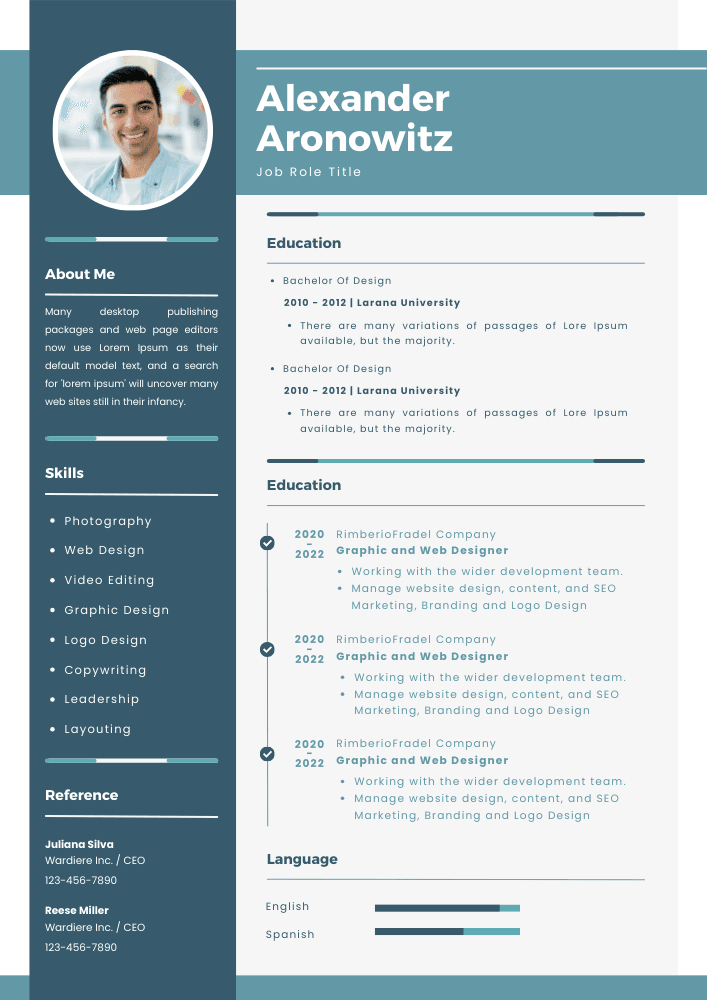
Common 2 Column Resume Structures:
- Narrow-Wide Split – Left sidebar (30%) with skills and contact info, right section (70%) with experience
- Equal Split – Two balanced columns (50/50) dividing all resume sections
- Asymmetric Layout – Left column (40%) and right column (60%) for balanced content distribution
The format appeals to creative professionals, recent graduates, and candidates in design-forward industries.
The Traditional 1 Column Resume Layout
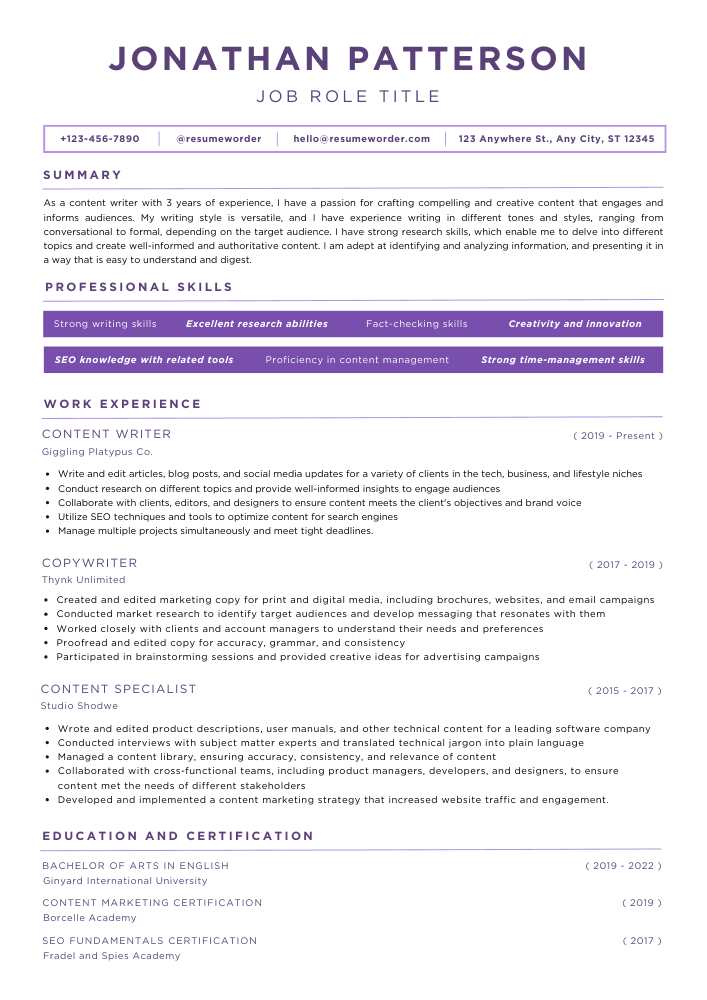
A 1 column resume follows a straightforward top-to-bottom reading pattern. All information flows in a single vertical line, starting with contact details and moving through each section sequentially.
This classic format has dominated professional resumes for decades. Recruiters find it familiar and easy to scan quickly during initial reviews.
Standard 1 Column Resume Organization:
- Header with name and contact information
- Professional summary or objective
- Work experience (reverse chronological order)
- Education credentials
- Skills section
- Additional sections (certifications, awards, volunteer work)
This layout works across all industries and career levels, from entry-level positions to executive roles.
Applicant Tracking Systems and Resume Columns
Applicant tracking systems (ATS) process resumes before human eyes see them. Understanding how these systems handle the 2 column or 1 column resume debate is critical for modern job seekers.
How ATS Software Reads Resume Formats
ATS technology scans resumes by parsing text in specific patterns. Most systems read from left to right, top to bottom, following standard document flow.
ATS Compatibility Issues with 2 Column Resumes:
- Text parsing errors when content splits into multiple columns
- Scrambled information order confusing the system’s reading sequence
- Lost data when ATS fails to recognize non-standard formatting
- Misplaced sections appearing in wrong database fields
- Incomplete keyword extraction reducing your match score
Modern ATS platforms have improved at handling complex layouts. However, parsing accuracy remains inconsistent across different systems and software versions.
1 Column Resume ATS Advantages
Single column resumes eliminate parsing ambiguity. The linear format ensures ATS software reads your information in the intended order without confusion.
Your work experience appears chronologically as designed. Skills populate correct database fields. Education details get properly categorized. Nothing gets lost in translation between your resume and the employer’s database.
ATS Best Practices for Column Selection:
- Financial services, healthcare, government → Use 1 column format
- Tech startups, creative agencies, design firms → 2 column acceptable with testing
- Applying through major job boards → Stick with 1 column for safety
- Direct company website applications → Check their career page for format clues
- Networking and direct contact → Either format works
Visual Appeal and Professional Presentation
First impressions matter when recruiters spend 6-8 seconds on initial resume reviews. The 2 column or 1 column resume choice directly affects visual impact.
2 Column Design Advantages
Two column layouts create immediate visual distinction. The format looks modern, organized, and design-conscious. Hiring managers notice the extra effort in presentation.
Design Benefits:
- More white space preventing overcrowded appearance
- Clear visual hierarchy separating different information types
- Modern aesthetic appealing to younger hiring managers
- Efficient space utilization fitting more content per page
- Eye-catching format standing out in traditional application pools
Graphic designers, marketing professionals, and creative roles benefit most from this visual sophistication.
1 Column Professional Reliability
Single column resumes communicate traditional professionalism. Conservative industries value this familiarity and respect conventional business standards.
The format focuses attention on content rather than design. Your accomplishments and experience take center stage without visual distractions.
Traditional Format Strengths:
- Universal acceptance across all industries and company types
- Easy reading pattern familiar to all recruiters
- Print-friendly layout maintaining quality when copied or faxed
- Professional appearance suitable for executive and senior positions
- Timeless design that won’t look dated in coming years
Industry-Specific Format Recommendations
Different industries maintain different expectations for the 2 column or 1 column resume discussion.
Industries Preferring 1 Column Resumes
Finance and Banking: Traditional formats dominate. Investment banks, accounting firms, and financial institutions expect conservative presentation. Your Goldman Sachs application needs straightforward, no-nonsense formatting.
Legal Profession: Law firms universally prefer single column resumes. Attorneys, paralegals, and legal support staff should avoid creative layouts. Focus on credentials and experience in standard format.
Healthcare and Medical: Hospitals, clinics, and medical practices favor conventional resumes. Doctors, nurses, and healthcare administrators benefit from traditional presentation that emphasizes qualifications clearly.
Government and Public Sector: Federal, state, and local government positions require standard formats. These applications often use specific templates and strict formatting requirements that single column layouts satisfy easily.
Industries Accepting 2 Column Resumes
Technology and Startups: Tech companies embrace modern resume designs. Software developers, product managers, and tech professionals can use two column formats effectively, especially at innovative companies.
Creative and Design Fields: Graphic designers, UX/UI professionals, and creative directors should showcase design skills through resume formatting. Two column layouts demonstrate design sensibility and attention to visual communication.
Marketing and Advertising: Marketing professionals benefit from modern formatting that reflects current design trends. Digital marketers, content creators, and brand managers can leverage two column layouts to stand out.
Architecture and Interior Design: Design professionals need resumes reflecting their aesthetic sensibilities. Two column formats allow portfolio integration and visual interest appropriate for these fields.
Space Efficiency and Content Optimization
The 2 column or 1 column resume debate often centers on fitting information into limited space without sacrificing readability.
2 Column Space Utilization
Two column formats excel at condensing information. You can fit more content on a single page by utilizing horizontal space effectively.
Example Layout Distribution:
Left Column (30-35% width):
- Contact information
- Core competencies (8-12 skills)
- Technical proficiencies
- Education (degree, school, year)
- Certifications
- Languages
- Professional associations
Right Column (65-70% width):
- Professional summary (3-4 lines)
- Work experience (3-4 positions)
- Key achievements with metrics
- Project highlights
- Awards and recognition
This distribution keeps your resume on one page while maintaining detailed information about your background.
1 Column Strategic Spacing
Single column resumes use vertical space deliberately. Each section gets dedicated space without competing for attention.
Optimal Section Spacing:
- Header: 15% of page
- Professional summary: 10% of page
- Work experience: 50% of page
- Education: 10% of page
- Skills: 10% of page
- Additional sections: 5% of page
This breakdown prioritizes work experience while giving adequate space to supporting information.
Readability and Information Hierarchy
How easily recruiters extract information from your resume depends significantly on your column choice.
Reading Patterns and Eye Tracking
Research shows recruiters follow F-shaped reading patterns. Eyes move horizontally across the top, then scan down the left side, with occasional rightward glances for interesting content.
2 Column Reading Challenges:
- Forced eye movement between columns disrupts natural flow
- Unclear reading order causing confusion about sequence
- Important information potentially missed in right column
- Difficult quick scanning during initial 6-second review
- Cognitive load increased by non-linear information processing
1 Column Reading Benefits:
- Natural top-to-bottom scanning matches reading habits
- Clear sequence ensuring nothing gets overlooked
- Easy quick scanning for key qualifications
- Reduced cognitive effort processing information
- Predictable structure familiar to all recruiters
Information Priority and Placement
Strategic information placement varies between formats and impacts how recruiters perceive your qualifications.
2 Column Priority Placement: Place your strongest qualifications in the right column’s top section. This catches attention immediately when eyes move across from your name. Use the left column for supporting details that enhance rather than compete with main content.
1 Column Priority Placement: Lead with your most impressive qualifications immediately below contact information. Put strongest work experiences first, most relevant skills prominently, and critical achievements where they can’t be missed.
Career Stage Considerations
Your career phase influences which format serves you best in the 2 column or 1 column resume decision.
Entry-Level and Recent Graduates
New professionals often lack extensive work history. Two column formats help by showcasing education, skills, coursework, and extracurricular activities without leaving excessive white space.
Sample Entry-Level 2 Column Distribution:
Left Column:
- Education (detailed with relevant coursework)
- Technical skills (grouped by category)
- Certifications and online courses
- Student organization leadership
- Volunteer experience
Right Column:
- Professional summary highlighting enthusiasm and potential
- Internship experience (detailed with achievements)
- Part-time work demonstrating responsibility
- Academic projects showcasing skills
- Awards and honors
This structure fills space with relevant information that might look sparse in single column format.
Mid-Career Professionals (5-15 Years)
Experienced professionals have substantial work history requiring adequate space. Single column formats typically serve this group better by allowing detailed experience descriptions.
Focus on accomplishments with metrics rather than cramming everything into tight two column spaces. Your track record deserves room to shine.
Mid-Career 1 Column Advantages:
- Sufficient space for 3-5 detailed position descriptions
- Room for quantified achievements under each role
- Clear career progression visibility
- Professional appearance matching career level
- Easy addition of leadership and management accomplishments
Senior-Level and Executive Candidates
Executive resumes demand traditional professional presentation. Senior leaders should default to single column formats that command respect and convey gravitas.
C-suite candidates, directors, and vice presidents need space for strategic accomplishments, board positions, and significant organizational impacts. Two column formats can appear too casual for these senior roles.
2 Column Vs. 1 Column Resume – Format Features
| Feature | 2 Column Resume | 1 Column Resume |
|---|---|---|
| ATS Compatibility | Moderate (60-70% success rate) | Excellent (95%+ success rate) |
| Visual Appeal | High – Modern and distinctive | Moderate – Professional standard |
| Information Density | High – Fits more per page | Moderate – Requires more pages |
| Reading Ease | Moderate – Non-linear flow | High – Natural top-to-bottom |
| Industry Acceptance | Creative fields mainly | Universal acceptance |
| Print Quality | Can have alignment issues | Excellent across all printers |
| Mobile Viewing | Difficult on small screens | Easy on all devices |
| Customization Options | Extensive design possibilities | Limited but proven effective |
| Time to Create | Longer – Design complexity | Faster – Straightforward layout |
| Professional Perception | Modern, design-conscious | Traditional, reliable |
Creating Hybrid Resume Approaches
Some professionals blend elements from both formats, creating resumes that capture benefits while minimizing drawbacks.
Modified Single Column with Visual Elements
Add visual interest to single column resumes without compromising ATS compatibility. Use subtle design elements that enhance rather than complicate.
Enhancement Techniques:
- Skills presented in horizontal rows rather than vertical lists
- Subtle shading or borders separating major sections
- Icons for contact information (phone, email, LinkedIn)
- Horizontal lines or dividers between work experiences
- Bold section headers with subtle background colors
These additions modernize traditional formats while maintaining parsing reliability.
ATS-Friendly Two Column Design
Create two column resumes that navigate ATS challenges more successfully through careful design choices.
ATS-Compatible 2 Column Strategies:
- Keep text-based content avoiding graphics and images
- Use simple fonts (Arial, Calibri, Georgia) throughout
- Ensure adequate spacing between columns (0.5-0.75 inches)
- Avoid tables for column creation (use text boxes instead)
- Test resume through ATS simulators before submission
- Save in both PDF and Word formats for different systems
- Create single column backup version for problematic applications
Testing Your Resume Format
Don’t guess about ATS compatibility. Test your 2 column or 1 column resume before sending applications.
Online ATS Testing Tools
Several platforms simulate ATS parsing to show how systems interpret your resume:
Popular Testing Resources:
- Jobscan – Compares your resume against job descriptions and shows parsing results
- Resume Worded – Provides ATS compatibility scores with specific improvement suggestions
- TopResume – Offers free ATS scans identifying potential parsing problems
- SkillSyncer – Shows exactly how ATS systems read your formatted content
Upload your resume to multiple testers since different platforms use various parsing technologies.
Manual Testing Methods
Test readability without specialized tools using these practical approaches:
Simple Format Tests:
- Copy your resume content into plain text editor (Notepad) – Does everything appear in logical order?
- Save as .txt file – Is information still comprehensible and well-organized?
- Email to yourself – Does formatting hold up across different email clients?
- View on mobile device – Can you read everything easily on a small screen?
- Print black-and-white copy – Does content remain clear without color?
If your resume fails these tests, simplify formatting or reconsider your column choice.
Expert Insights and Professional Recommendations
Career coaches, professional resume writers, and hiring managers offer valuable perspectives on the 2 column or 1 column resume debate.
What Resume Writers Say
Certified Professional Resume Writers (CPRW) report that client success rates vary by format choice. Single column resumes generate more interview callbacks in most industries, though creative fields show different patterns.
Top resume writers recommend matching format to your specific situation rather than following blanket rules. They assess your industry, target companies, career level, and content volume before suggesting optimal layouts.
Must Read: Should You Put Your Address on Your Resume? What Experts Says ?
Recruiter Preferences
Corporate recruiters reviewing hundreds of resumes weekly prefer formats that facilitate quick information extraction. Most report that single column resumes enable faster screening and more confident candidate evaluation.
Technical recruiters in software and engineering fields show more openness to two column formats, especially when candidates demonstrate strong technical skills requiring visual organization.
Agency recruiters representing multiple industries typically recommend single column formats for maximum versatility across different client companies.
Hiring Manager Perspectives
Hiring managers making final decisions focus more on qualifications than format. However, resume layout affects their ability to find relevant information quickly during busy screening sessions.
Managers in traditional industries express mild skepticism about overly designed resumes, viewing them as potential red flags about candidate judgment. Progressive industry leaders appreciate modern design that reflects current trends.
Common Mistakes to Avoid
Both formats can fail when implemented poorly. Recognizing these errors helps you create more effective resumes.
2 Column Resume Pitfalls
Critical Errors:
- Overcomplicating design with excessive colors, fonts, and visual elements
- Making columns too narrow so text appears cramped and difficult to read
- Placing crucial information in less-viewed column positions
- Using graphics, charts, or images that ATS cannot process
- Creating inconsistent spacing between similar information types
- Choosing hard-to-read fonts for sake of looking different
- Forgetting to test resume on different devices and platforms
Many job seekers get excited about design possibilities and sacrifice functionality for aesthetics.
1 Column Resume Problems
Frequent Issues:
- Creating walls of text without adequate white space breaks
- Using tiny fonts to cram more content onto pages
- Making resume too lengthy (3+ pages) for non-academic positions
- Presenting information in boring, identical bullet point format
- Neglecting visual hierarchy leaving all text same size and weight
- Failing to bold or emphasize key accomplishments
- Including outdated or irrelevant work experience consuming valuable space
Traditional format doesn’t mean boring. Single column resumes need strategic design within conservative parameters.
Making Your Final Format Decision
Consider these decisive factors when choosing between 2 column or 1 column resume formats for your specific situation.
Decision Framework
Ask yourself these critical questions:
Industry and Role: Does your target industry value creative presentation or traditional professionalism? Are you applying to startups or established corporations?
Application Method: Will you submit through major job boards (prefer 1 column), company websites (either works), or direct networking (2 column acceptable)?
Content Volume: Do you have extensive experience needing multiple pages (1 column better) or concise information fitting one page (2 column works)?
Technical Comfort: Can you design and troubleshoot complex layouts, or do you prefer straightforward formatting?
Risk Tolerance: Are you willing to risk ATS parsing issues for visual impact, or do you prioritize compatibility over aesthetics?
The Safe Choice
When uncertain, single column format represents the safer selection. You sacrifice some visual distinctiveness but gain universal compatibility and acceptance.
This choice particularly makes sense for:
- Career changers entering new industries
- Professionals targeting multiple different sectors
- Job seekers applying to hundreds of positions through various channels
- Candidates in traditional, conservative fields
- Anyone prioritizing interview callbacks over design innovation
The Bold Choice
Two column format works when you can accept higher risk for potentially higher reward. This choice makes sense for:
- Creative professionals in design-forward industries
- Recent graduates needing to showcase diverse qualifications compactly
- Career professionals targeting specific companies known for valuing design
- Candidates with strong networks applying through referrals
- Job seekers willing to create multiple resume versions for different scenarios
Practical Implementation Tips
Once you decide between 2 column or 1 column resume formats, implement your choice effectively.
Creating Professional 2 Column Resumes
Design Software Options:
- Canva – User-friendly templates with easy customization
- Adobe InDesign – Professional design control for advanced users
- Microsoft Word – Table-based layouts with familiar interface
- Google Docs – Collaborative editing with shareable templates
- Figma – Design tool offering precise layout control
Choose software matching your technical skills and design needs.
Technical Specifications:
- Page margins: 0.5-0.75 inches all sides
- Column gap: 0.5-0.75 inches between columns
- Font size: 10-12 points for body, 14-16 for name
- Line spacing: 1.0-1.15 for readability
- Color scheme: Maximum 2-3 coordinating colors
Building Strong 1 Column Resumes
Format Guidelines:
- Standard margins: 1 inch all sides (0.75 inches minimum)
- Clear section headers: 14 points, bold, all caps or title case
- Consistent bullet points: Round, square, or dash style
- Adequate white space: Blank line between sections
- Strategic bolding: Company names, job titles, achievement metrics
Content Organization:
Place highest-impact information in top half of first page. Recruiters focus most attention here during initial screening. Lead with accomplishments rather than responsibilities. Use action verbs and quantified results.
Adapting Your Resume for Different Situations
Professional job seekers often maintain multiple resume versions optimized for different scenarios.
Version Strategy
Master Resume – 1 Column: Comprehensive document listing all experience, skills, and achievements. Use this as your source document for creating targeted versions.
ATS-Optimized – 1 Column: Stripped-down format focusing on keyword optimization and parsing compatibility. Deploy this version for online job board applications and large corporation submissions.
Networking Resume – 2 Column: Visually appealing format for direct contact with industry professionals, informational interviews, and career fair distribution. This version prioritizes impact over ATS concerns.
Industry-Specific Versions: Customize content and format for each target industry. Financial services resume uses conservative 1 column. Creative agency resume uses modern 2 column.
Tracking Format Performance
Monitor which resume format generates better results for your specific search:
Success Metrics:
- Application-to-response rate by format type
- Interview invitations per resume version
- Feedback from networking contacts on visual appeal
- ATS screening success indicators
- Time spent creating and updating each format
Data-driven decisions beat assumptions. Track real results and adapt accordingly.
Conclusion: Choosing Your Optimal Resume Format
The 2 column or 1 column resume question lacks a universal answer. Your optimal choice depends on your unique circumstances, target industry, career stage, and application strategy.
Single column resumes offer proven reliability across all situations. They work universally, parse correctly through ATS, and maintain professional standards that hiring managers expect. Choose this format when you prioritize consistency and compatibility over visual distinction.
Two column resumes provide modern visual appeal and efficient space utilization. They work best in creative industries, for networking purposes, and when applying directly to companies where ATS parsing concerns diminish. Select this format when you can manage the additional complexity and accept potential parsing risks.
Many successful job seekers maintain both formats, deploying each strategically based on specific application circumstances. This flexible approach maximizes your chances across different scenarios.
Focus ultimately on content quality rather than format perfection. Outstanding accomplishments, quantified achievements, and relevant skills matter more than column choices. Whichever format you select, ensure your resume communicates your professional value clearly, concisely, and compellingly.
Test your chosen format thoroughly before widespread use. Verify ATS compatibility, check readability across devices, and gather feedback from trusted professional contacts. Your resume represents your first impression—make it count by choosing the format that best showcases your unique qualifications to your target employers.
FAQs
Which resume format is better for most job applications?
A one column resume works best for most applications because it improves readability, supports ATS parsing, and allows recruiters to scan experience and skills quickly without layout confusion or missing information.
When is a two column resume a good choice?
A two column resume suits creative roles such as graphic design or UI work, where visual presentation matters more and resumes are reviewed manually rather than processed through applicant tracking systems.
Do ATS systems handle two column resumes properly?
Most ATS systems struggle with two column resumes because they read content linearly, often mixing sections and misplacing keywords, which can reduce resume accuracy during automated screening.
Is a one column resume too basic or outdated?
A one column resume is not outdated; it is widely preferred by recruiters due to its clarity, professional appearance, adaptability across devices, and compatibility with modern hiring systems.
Can I use both resume formats during my job search?
Yes, you can use a one column resume for online applications and ATS screening, while keeping a two column version for interviews, portfolios, or roles emphasizing visual design skills.
How do I choose the right resume format for my career?
Choose a one column resume for technical, corporate, or remote roles, and consider a two column resume only when visual design skills are central to job evaluation.
Related Posts
How Many Pages Should a Resume Be? Best Guide for Job Seekers

Hobbies & Interests Section in Resume 2026 with Examples

How to list Language Skills Section on Resume 2026 – Best Examples & Tips

How to List Internships at Same Company Twice in Resume
Common Resume FAQs & Answers You Should Know in 2026